Generating Documents


Generating Documents |
|
|
In Assyst Real Estate, documents can be generated in Microsoft Word or PDF format. Documents generated through Assyst Real Estate always use the information included in the File information tab. This information is merged in documents at the appropriate positions.
To generate a document
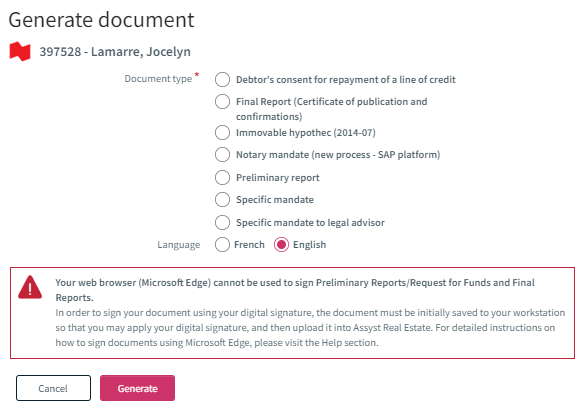
1.Click the Documents tab. This will display the categories of documents available for the file. 2.Click Generate Document at the top right of the documents list. The window Generate Document is displayed.
3.In the Document type section, select, using the radio button, the type of document you want to generate. 4.In the Language section, select, using the radio button the language in which the document has to be generated: English or French. 5.Click the Generate link. This will open the Generate Document dialog box. This window displays the list of the information required to generate the document. This information comes from the File information tab. The missing information that is required is indicated. 6.Click the Generate button to start the generation process. The document is generated by retrieving the information existing in the database. The name of the generated document appears automatically below the document category in which it was created. Once generated, you can open the document to consult it, modify it or print it. |