Access your Settings and profile


Access your Settings and profile |
|
|
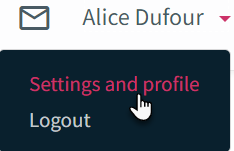
The objective of this section is to explain where you can access your settings and profile. It also introduces the different information available in your Settings and Profile section. To access your settings and profile 1.Click the Settings and profile button in the top left section of the Assyst Real Estate main page.
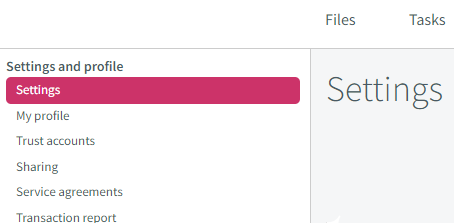
The Settings and profile section is organized into the following pages (tabs): •Settings: Includes different parameter setting information such as your alerts, your out of office notification, your password and your payment information. Refer to Settings section. •My profile: Includes the information relative to your coordinates, your name, your address and your contact information (phone, fax and email) . Refer to My profile section. •Trust accounts (Legal counsels only): Includes the information relative to your funding method. Refer to Trust accounts section. •Sharing (Legal counsels only): Includes the list of legal assistants and legal counsels with who you share your files and their access rights. Refer to Sharing section. •Service agreements: Allows to view the different Service agreements (Assyst Real Estate and Assyst Payment). Refer to Service agreements section. •Transaction report: Allows to generate Transaction reports for Assyst Real Estate. Refer to Transaction reports section. •Legal counsels (legal assistants only): Includes the list of legal counsels you work for. Refer to Adding/Removing Legal Counsels. •Security: Allows to manage your security questions. Refer to Security section.
|