|
You can send a question to Scotiabank by using the Notes section of your file.
This method, preferred by the bank, enables you to obtain a quick response while avoiding telephone calls with the bank.
| ➢ | Send a note to the lender |
| 1. | Click the Add a Note button. This will open the Add a Note dialog box. |
| 2. | A scrolling list Send this note to the lender enable you to select the option Yes or No. |
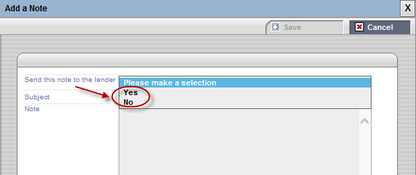
| 3. | Select Yes to send a note to the lender. |
| 4. | Enter the note to send to the lender in the Note field provided. |
The note is sent to the lender and displayed in the Notes tab.
| 

