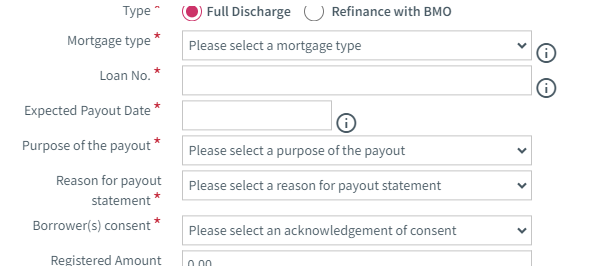
Type: The radio button is defaulted to Full Discharge
Mortgage type: drop-down menu will allows you to select the type of mortgage. Values are: Conventional or Collateral
Expected Payout Date: a calendar allows you to select the expected date on which the statement is required
Purpose of the payout: drop-down menu will allows you to select the purpose of the payout.
Reason for payout statement: drop-down menu will allows you to select the reason for payout statement. Values are: Discharge or Transfer. If Transfer value is selected, new fields are displayed to allow you to enter additional information. (See Reason for payout statement)
Borrower(s) consent: drop-down menu will allows you to select yes or no
Registered Amount: field that allows you to enter the registered amount
|